The Control screen
Last updated: 27 August 2026
Control is where every active restriction for a child lives — a summary card up top, then a list (or grid) of the five controls, each showing its current status at a glance.
Reading the screen
- "X child protected" / "Add child" sits at the top, along with a "Hand to [name]" banner if this device hasn't been switched into that child's view yet.
- The child card shows their name, age, today's screen time, and how many of the 5 controls are currently active.
- List or Grid switches how the 5 controls below are laid out — same information either way.
- Each control row shows a one-line status — "1h a day · 0m used," "No apps blocked," "20:00 – 07:00," "14 categories off," "Allowed" — tap any of them to open it.
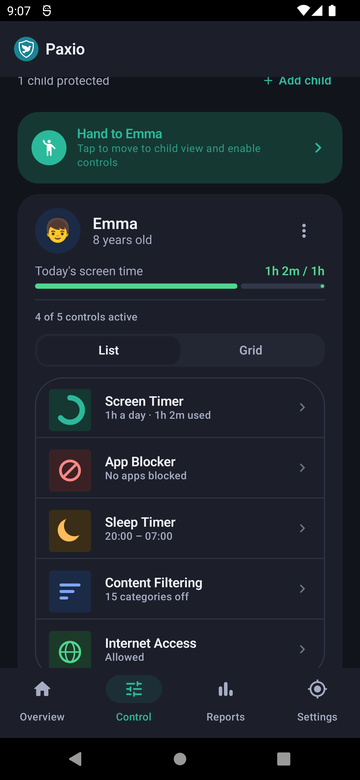
List view.
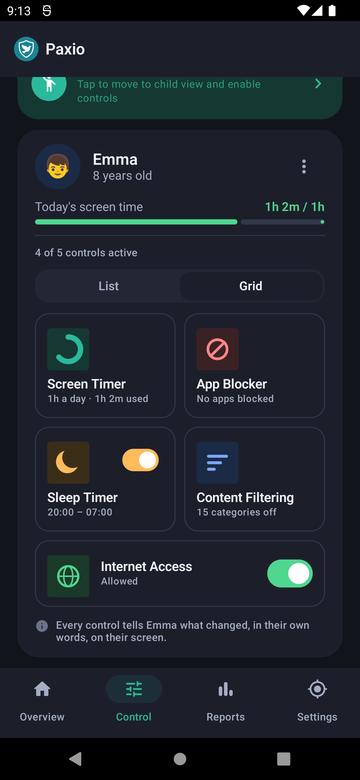
Grid view.
A short note at the bottom of the grid view is worth knowing: every control tells your child what changed, in their own words, on their screen — Paxio doesn't make changes silently.
Each of the 5 controls has its own detailed screen — see Each control, explained for what's inside every one.