Child Dashboard

What your kid sees matters just as much

Give your kid their own screen time view, not just restrictions — a countdown ring for time left today and a 7-day streak row, just today's picture. Switching back to the parent view needs the PIN, so picking up the phone doesn't hand over the whole dashboard.
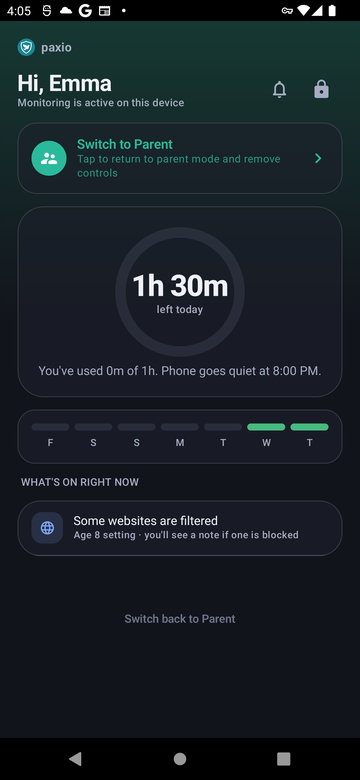
Today's picture, from their side

Give your kid their own screen time view, not just restrictions — a countdown ring for time left today and a 7-day streak row, just today's picture. Switching back to the parent view needs the PIN, so picking up the phone doesn't hand over the whole dashboard.

Paxio child dashboard showing a time-left ring and a 7-day streak row
The details

How it actually works

Designed to inform, not confront

A dashboard your kid can actually check without dreading it.

  • A countdown ring shows time left today at a glance — no need to ask a parent.
  • A plain-language “what's on right now” summary replaces a list of blocked apps and restrictions.
  • No shaming language or red warning colors — it's built as information, not a scoreboard of what's forbidden.

The streak row

Good habits get visible credit.

  • A 7-day streak row shows how many days in a row have stayed under the screen time limit.
  • The streak bonus grows automatically at milestones — +15 minutes at 3 days, up to +60 minutes at 30 days — visible progress toward something, not just a restriction avoided.
  • The streak resets only when a day goes over the limit, not for any other reason.

PIN-gated switching

The child view can't accidentally become the parent view.

  • Switching back to the parent dashboard from a shared device always requires the PIN.
  • A child using their own dedicated device only ever sees the child dashboard — there's no parent view to switch to on that device.
  • This is the same PIN that protects every other setting in the app.
Setup

Get it running in under a minute

1

Set up a child profile

Add your child's profile during onboarding or from Settings.

2

Choose the device type

Dedicated child device or shared — this determines whether a parent view exists on that device.

3

The child dashboard is ready

It becomes the default view whenever the device is in child mode.

FAQ

Child Dashboard — common questions

Can my child see how much screen time they have left?

Yes — a countdown ring on their dashboard shows time left today, so there are no surprises when the limit is close.

Does the child dashboard show a list of blocked apps?

No — it shows a plain-language summary of what's currently on, not a list of restrictions to push back against.

Can my child switch to the parent dashboard?

Only with the parent PIN — on a shared device, switching views always requires it. On a dedicated child device, there's no parent view to switch to at all.

How does the streak row work?

It counts consecutive days under the daily screen time limit. The streak bonus grows automatically at 3, 7, 15, and 30 days running, and resets when a day goes over the limit.

Try Paxio free → See all controls