Track your kid's phone usage automatically with Daily, Weekly, or Monthly reports — each with a usage trend chart and seven stat tiles: screen time, over-limit days, blocked-app attempts, average session length, and requests sent. Plus a weekly recap emailed to you automatically.
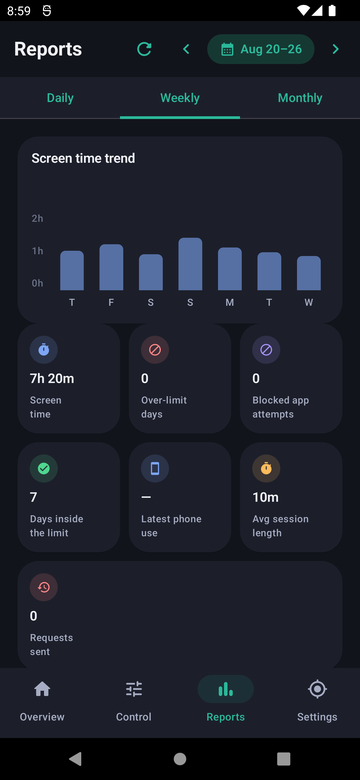
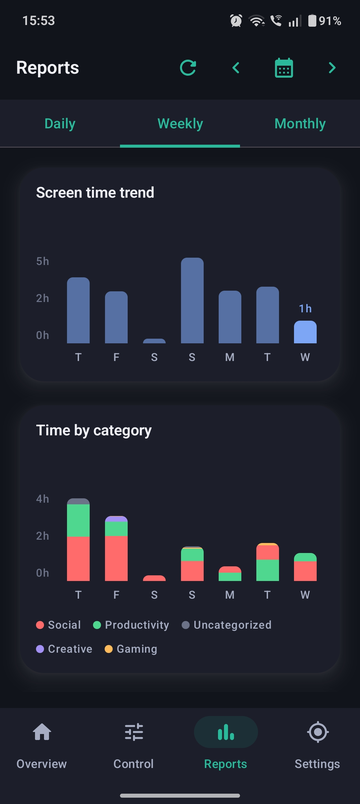
Zoom in on today, or step back for the trend.
Beyond just “screen time.”
The same numbers, without opening the app.
From the parent dashboard, tap Reports, or find it in the main navigation.
Switch between Daily, Weekly, and Monthly tabs.
Scan for anything unusual, like a spike in blocked-app attempts.
Free shows 3 stats and 30 days of history. Pro unlocks all seven stat tiles and a full year of history.
No — a weekly digest with the same numbers is emailed automatically, and you can opt in or out per event type from Settings.
Any time your child opens an app that's set to Blocked, it's logged as an attempt and shown on the Reports screen.
Yes — each child profile has its own separate Reports screen, since each has its own limits and usage.