Internet Pause

Disable your kid's internet, instantly

Disable internet access on your kid's phone instantly — a master switch plus quick presets (30 minutes, an hour, or Dinner) for cutting off internet outright, without touching any other limit. Calls and texts keep working, since they run over the carrier network, not data.
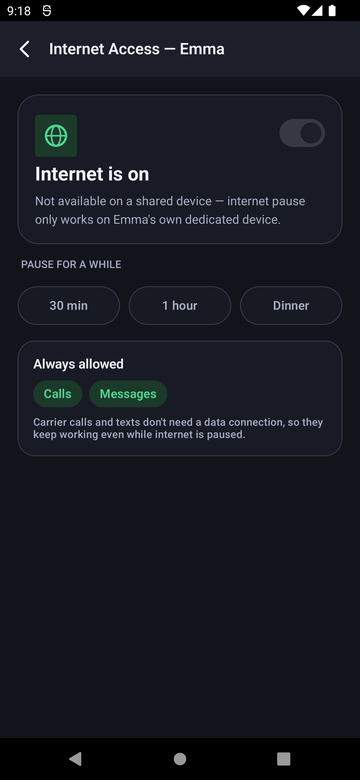
Kill your kid's internet access in one tap

Turn off internet on your kid's phone in one tap — a master switch plus quick presets (30 minutes, an hour, or Dinner) for disabling internet outright, without touching any other limit. Calls and texts keep working, since they run over the carrier network, not data.

Paxio Internet Access screen with an on/off toggle and quick pause presets
The details

How it actually works

Instant or timed

Pause however the moment calls for it.

  • A master toggle pauses internet access immediately, for as long as you leave it off.
  • Quick presets — 30 minutes, 1 hour, or Dinner — pause automatically and resume on their own.
  • Pausing internet doesn't touch the screen time limit, app blocking, or content filter settings — they resume exactly as configured once internet is back on.

What still works during a pause

A pause isn't a full device lockout.

  • Calls and text messages keep working, since they run over the carrier network, not data or Wi-Fi.
  • Apps that don't need the internet keep working normally.
  • The pause applies to both Wi-Fi and mobile data at once.

Device requirements

This one has a real limitation worth knowing.

  • Internet pause only works on a child's own dedicated device, not a phone that's shared between parent and child.
  • It's a full-device pause — there's no way to pause internet for one specific app while leaving others online. To stop one app from being used at all, rather than just its internet access, use App Blocking instead.
Setup

Get it running in under a minute

1

Open Internet Access

From Control, tap Internet Access, or use the Overview shortcut.

2

Toggle off, or pick a preset

Flip the master switch, or tap 30 min / 1 hour / Dinner for a timed pause.

3

Resumes automatically

A timed pause turns internet back on by itself — no need to remember to re-enable it.

FAQ

Internet Pause — common questions

Does pausing internet stop calls and texts too?

No — calls and texts run over the carrier network, not data, so they keep working through a pause.

Does internet pause work on a phone I share with my child?

No — it's designed for a child's own dedicated device. On a shared device, pausing internet would affect the parent's use of the phone too.

Do the screen time limit and app blocking still apply after the pause ends?

Yes — pausing internet is independent of those settings, so everything resumes exactly as configured once internet is back on.

Can I pause internet for just one app?

Not today — internet pause is a full-device toggle. Per-app control is handled separately through App Blocking.

Try Paxio free → See all controls