Delete Your Paxio Account
Last updated: August 2026
This page explains how to delete your Paxio parent account and the data associated with it. Account deletion is self-service, directly in the app — there is no support-ticket or email-request process for this.
Delete your account in the app
- Open Paxio and enter your parent PIN.
- Go to the Settings tab and scroll to the bottom.
- Tap Delete Account, shown in red below Sign Out.
- Review the warning and tap Delete to confirm.
- Enter your parent PIN again when asked — this is the step that actually deletes everything.
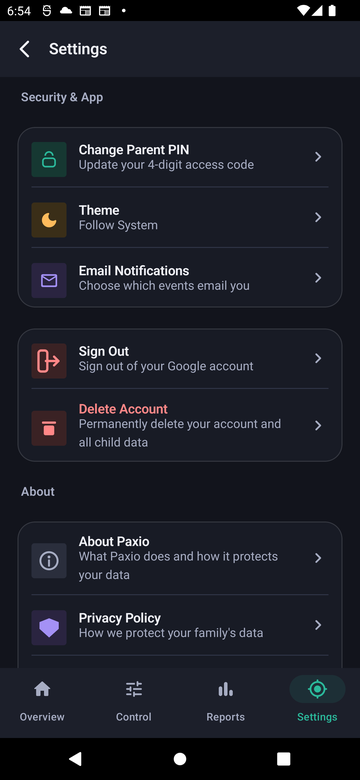
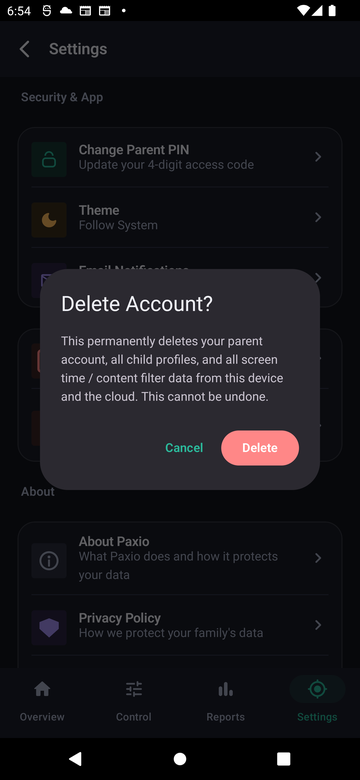
Deletion happens immediately — your account, child profiles, and cloud data are removed right away, no waiting period. If Paxio asks you to sign in again first, this is a Google security requirement for account deletion (it only appears if you haven't signed in recently); sign back in and repeat the steps above.
What gets deleted
| Data | Outcome |
|---|---|
| Parent account (email, authentication record) | Permanently deleted from Firebase Authentication |
| Child profile(s) (name, age, avatar, daily limit, bedtime settings) | Permanently deleted from Firestore |
| Parent PIN (stored only as a salted hash) | Permanently deleted from Firestore |
| Screen-time usage history, app-blocking lists, content-filter rules, per-app time limits, blocked-site visits, blocked-app attempts, and install/uninstall events, for every child on the account | Permanently deleted from both the local on-device database and Firestore, immediately |
What is not affected
Anonymized crash/diagnostic reports already sent to Firebase Crashlytics prior to your deletion request may be retained by Google under their own standard retention period, as they are not linked back to your account identity.
Contact
Questions about account deletion: support@paxio.in.