Parent Dashboard

Everything, in one glance

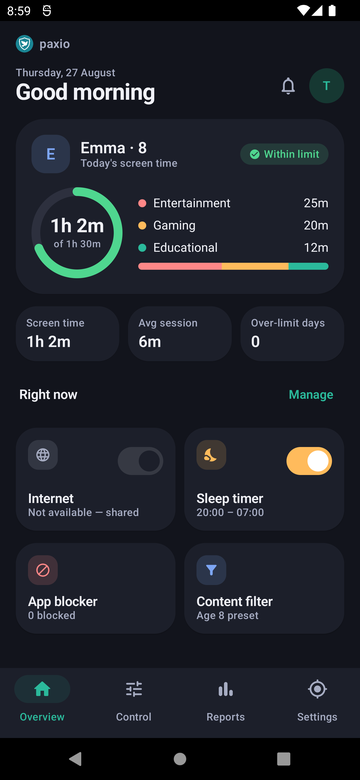
Monitor your kid's phone usage from one screen — today's usage ring, a pending-request banner, and four one-tap shortcuts to Internet, Sleep timer, App blocker and Content filter. It's the first screen you see, and usually the last one you need to open.
Today's picture, at a glance

Monitor your kid's phone usage from one screen — today's usage ring, a pending-request banner, and four one-tap shortcuts to Internet, Sleep timer, App blocker and Content filter. It's the first screen you see, and usually the last one you need to open.

Paxio parent Overview screen showing a usage ring, category mix, and weekly stat tiles
The details

How it actually works

What's on the dashboard

Everything that matters today, without digging through menus.

  • A usage ring showing today's screen time against the daily limit, with a category breakdown.
  • This week's trend compared against last week.
  • A pending-request banner whenever your child has an extra-time or unblock request waiting.

One-tap shortcuts

Common changes don't need a trip into Control.

  • Internet, Sleep timer, App blocker, and Content filter each get a direct shortcut from the dashboard.
  • Approving or denying an extra-time request takes one tap from the pending banner.
  • Deeper settings for any control are always one more tap away in Control.

Built for daily use

Designed to be checked in seconds, not minutes.

  • Usage numbers are read live from Android's own usage tracking, not a cached estimate.
  • No setup or configuration needed — it's the default landing screen after opening Paxio.
  • Switching to the child-facing view from a shared device requires the parent PIN.
Setup

Get it running in under a minute

1

Open Paxio

The parent dashboard is the default screen after sign-in.

2

Check today's ring and any pending requests

A glance tells you if anything needs a decision.

3

Use a shortcut if something needs changing

Tap Internet, Sleep timer, App blocker, or Content filter directly from the dashboard.

FAQ

Parent Dashboard — common questions

Is the parent dashboard the first thing I see when I open Paxio?

Yes — it's the default landing screen after sign-in, showing today's usage and any pending requests.

Where do usage numbers on the dashboard come from?

They're read live from Android's own usage tracking, the same source used across the app, not a cached estimate.

Can I change a setting directly from the dashboard?

Yes for the four most common controls — Internet, Sleep timer, App blocker, and Content filter each have a one-tap shortcut. Everything else is one more tap away in Control.

How do I get back to the parent dashboard from the child view on a shared device?

Switching back requires your parent PIN, so picking up the phone doesn't hand over the whole dashboard.

Try Paxio free → See all controls