Bedtime Schedule

Bedtime that enforces itself, every night Pro

Set a bedtime schedule for your kid's phone, once — a common sleep and wake time, on the days you choose. At the sleep time, everything but calls goes quiet until morning, whether or not they've hit their daily limit.
Bedtime scheduling is part of Paxio Pro. The free plan covers the daily screen time limit, app blocking and content filtering.

A schedule the phone can't argue with

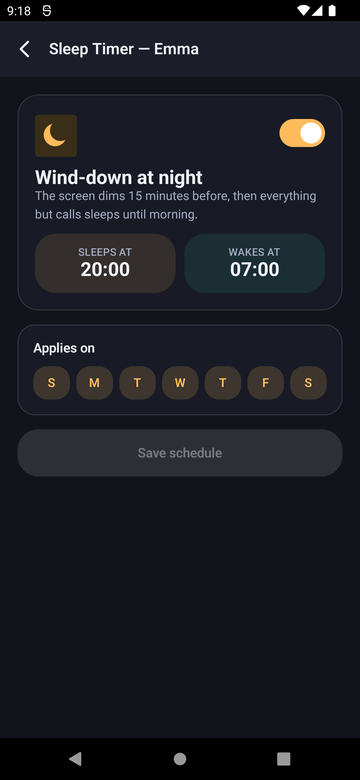
Set a bedtime schedule for your kid's phone, once — a common sleep and wake time, on the days you choose. At the sleep time, everything but calls goes quiet until morning, whether or not they've hit their daily limit.

Paxio Sleep Timer screen with a sleep and wake time
The details

How it actually works

One common schedule

Set it once, and it repeats every day.

  • One sleep and wake time, with an "Applies on" day picker — switch bedtime off for specific days (Friday and Saturday, say). A different sleep time per day isn't supported yet.
  • The schedule handles times that wrap past midnight correctly — a 10pm–6am window works as expected.

The lock, and what it covers

Straightforward enforcement, no ambiguity about when it kicks in.

  • At the sleep time, everything but phone calls goes quiet until the wake time.
  • This is a separate mechanism from the daily screen time limit — a kid well under their daily budget still can't be on the phone during bedtime hours.

What stays available

Bedtime isn't a total lockout.

  • Calls always go through, even during a bedtime window.
  • The device wakes back up automatically at the scheduled wake time — no manual unlock needed.
  • A parent can end a bedtime window early from the Overview screen if needed.
Setup

Get it running in under a minute

1

Open Sleep Timer

From Control, tap Sleep Timer.

2

Set sleep and wake time

Pick a sleep and wake time, then choose which days it applies on.

3

Save — it repeats automatically

The schedule runs every matching day going forward, no need to re-set it.

FAQ

Bedtime Schedule — common questions

Does bedtime override the daily screen time limit?

They're separate mechanisms — a child can be well under their daily screen time limit and still be locked out during a bedtime window, and vice versa.

Can I set a different bedtime for weekends?

Partly — use "Applies on" to turn bedtime off for chosen days (no lock on Friday and Saturday, for example). A different sleep time per day isn't supported yet.

What happens right at bedtime — does the phone just shut off?

At the scheduled sleep time, the device locks until the wake time — calls still go through, everything else goes quiet.

Can my child still receive a call during bedtime?

Yes — phone calls always go through, even during a bedtime window.

See Pro pricing → See all controls