Screen Time Limit

A daily screen time limit that actually enforces itself

Set a time limit for your kid's screen time once, in 15-minute steps from 30 minutes to 24 hours, and Paxio enforces it automatically — no reminders, no manual check-ins.

One number, enforced automatically

Paxio is the app that controls screen time on your kid's Android phone from one screen. Set a time limit for their screen time once, in 15-minute steps from 30 minutes to 24 hours, and it enforces itself — no reminders, no manual check-ins.
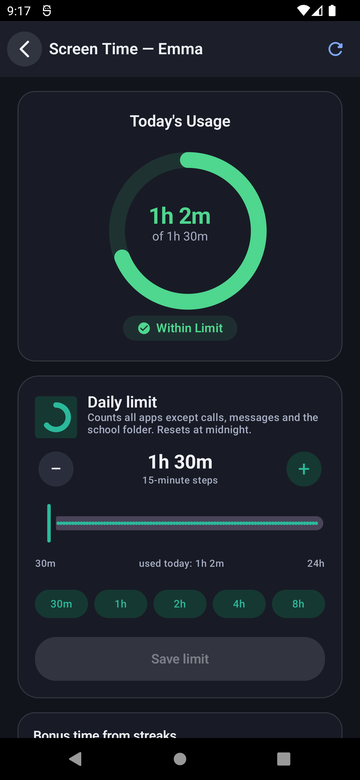
Paxio Screen Time screen showing a daily limit slider from 30 minutes to 24 hours
The details

How it actually works

What counts against the limit

Every app on the device counts toward the daily total, with one deliberate exception.

  • Phone calls and text messages never count — your kid can always reach you.
  • The limit resets automatically at midnight, no manual reset needed.

What your kid sees

The limit isn't a secret — it's visible and predictable.

  • A countdown ring on the child dashboard shows exactly how much time is left today.
  • Your child can request more time right from the lock screen — no need to find you in person.
  • That request lands on your phone instantly for a one-tap approval or denial, from anywhere, fully online — nothing needs you physically nearby, and the change applies automatically the moment you approve it.
Setup

Get it running in under a minute

1

Open Control

From the parent Overview screen, tap the Screen Time shortcut, or go to Control → Screen Time.

2

Set the daily cap

Drag the slider to a limit in 15-minute steps, or tap a quick preset.

3

Save — it's live immediately

The limit starts enforcing the moment you save, no restart or sync delay.

FAQ

Screen Time Limit — common questions

Does the screen time limit apply to every app?

Yes, with one exception: phone calls and texts never count against the daily limit.

What happens when the limit is reached?

The device locks to a simple home screen showing the limit was reached, with calls and texts still available. Your child can send an extra-time request right from that screen — it lands on your phone for a one-tap approval or denial, from anywhere.

Can I set a different limit for weekends?

Not as a separate weekend schedule today — but the streak bonus adds extra minutes automatically as your child stays under the daily limit for a run of days.

Can my child see how much time they have left?

Yes — the child dashboard shows a live countdown ring, so there are no surprises when the limit is close.

Try Paxio free → See all controls