The Overview screen
Last updated: 27 August 2026
Overview is the first tab you land on, and the one glance-and-done summary for whichever child is selected — greeting header, today's status, this week's trend, and a few one-tap shortcuts.
Reading the screen
- Pending requests — if your child has asked for more time, a bedtime pause, or to unblock an app, it appears as a banner at the top with Approve/Not now.
- The child card shows a usage ring (used vs. daily limit), a traffic-light status ("Within limit," "Close to limit," "Over limit"), and today's top categories.
- The trend row compares this week's screen time, average session, and over-limit days against last week.
- "Right now" has two quick toggles (Internet, Sleep timer) and two shortcuts (App blocker, Content filter) that jump straight into that control.
- More than one child? A dropdown next to your avatar switches which one Overview is showing.
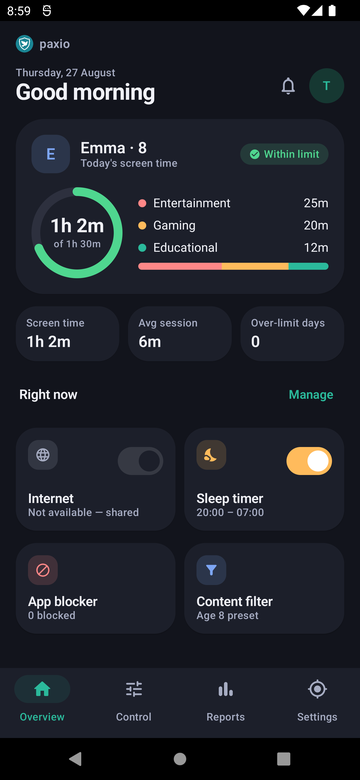
The Overview screen.
A couple of things worth knowing
- Internet and Sleep timer are Pro features to configure — a Free plan sees the same toggles, gated behind an upgrade prompt.
- A new child with no device enrolled yet shows a step-by-step "waiting for their phone" banner instead of a usage ring, since there's nothing to report until that device signs in.